
今、Web Componentを試す2つのアプローチ。sample動作編。polymer.js & dart:web_ui
■ Web Componentについて
GoogleIOのセッション(https://developers.google.com/events/io/sessions/324149970)
でWebComponentが紹介されたということで、WebComponent界隈が賑わって来ております。
具体的にはどういうことなの?というお話は詳しい解説が様々な所にあるのでお任せするとして。 http://steps.dodgson.org/b/2013/05/19/polymer-and-web-components/
http://www.slideshare.net/shumpei/web-component-14846079
今回は話題になってきている「polymer.js」とDartの「web_ui」によるHello Worldをやってみたいと思います。
- ■ polymer.js
- http://www.polymer-project.org/
- ■ web_ui
- http://pub.dartlang.org/packages/web_ui
■ polymer.jsをとりあえず試す
使用ツール
■ git
■ python SimpleHTTPServer
#polymer.jsとその他もろもろ。 git clone git://github.com/Polymer/polymer.git —recursive #toolkit 使用例とか git clone git://github.com/Polymer/toolkit-ui.git —recursive python -m SimpleHTTPServer 8080
—recursiveでgitのsubmoduleもcloneしてきています。

で、おもむろにsimpleServerを立て http://localhost:8080/toolkit-ui/workbench/menu.html,等にアクセス。
web componentの書き方や機能を確認してみましょう。なんか見慣れないimportやタグがあるかと思います。
animation/components.html
こんなんとか

■ Dart:web_uiをとりあえず試す
使用ツール
■ dart editor
- こちらもおもむろにDart Editorを起動してnew applicationを選択
- Sample content内、Generate sample contentにチェックを入れ
* Web application(using the web_ui library)を選択
- 作られたサンプルにある「build.dart」をRun!
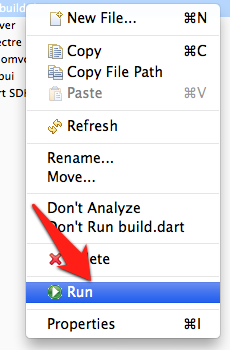
- 生成されたhtmlを右クリックして「Run in Dartium」
- Web Componentが書かれたサンプルを拝見!
次回以降は何か作ってみて、自分なりに解釈してみたいと思います。
